From experiment to impact: Breaking through the GenAI production barrier
Turn pilots into enterprise-scale success with Slalom and Databricks’ GenDocIQ accelerator
Published:
Updated:
12 minute read
TL;DR
- Most generative AI initiatives never reach production because organizations struggle with trust, customization, and operational complexity—not a lack of promising ideas.
- Slalom's GenDocIQ accelerator helps teams build production-ready retrieval-augmented generation (RAG) applications faster by automating infrastructure, evaluation, and deployment on Databricks.
- By combining enterprise data with built-in evaluation and governance, organizations can move from AI experimentation to scalable, trustworthy business outcomes.
Why most Gen AI pilots never reach production
Generative AI (GenAI) has captured the imagination of nearly every industry. Proof of concept and demos are everywhere—but meaningful production-ready deployments remain rare. According to a widely cited MIT report, only a fraction of GenAI pilots ever make it into the real world where they can actually move the needle on efficiency, innovation, and growth.
Why the disconnect? Two barriers consistently stand in the way:
- Trust—skepticism about whether AI outputs are accurate, safe, and reliable.
- Fit—the difficulty of customizing models to reflect the unique data, context, and needs of each organization.
At Slalom and Databricks, we believe solving these challenges isn’t optional—it’s essential for unlocking GenAI’s full value. That’s why we built the GenDocIQ accelerator: a powerful, production-ready framework that turns institutional knowledge into context-aware, trustworthy AI applications.
What is the GenDocIQ accelerator?
GenDocIQ is a streamlined accelerator that helps AI engineers rapidly design, build, and deploy retrieval-augmented generation (RAG) models. This cutting-edge approach blends the reasoning power of large language models (LLMs) with tailored retrieval from your organization’s own data, producing outputs that are accurate, relevant, and explainable.
Following Databricks’ best practices for transparency and design, GenDocIQ makes it simple to:
- Define resources with a lightweight configuration file
- Automatically provision all necessary Databricks components
- Focus engineering energy on improving performance instead of wrangling infrastructure
How does it work?
The accelerator sets up a complete pipeline for building production-ready RAG models that are maintainable and measurable.
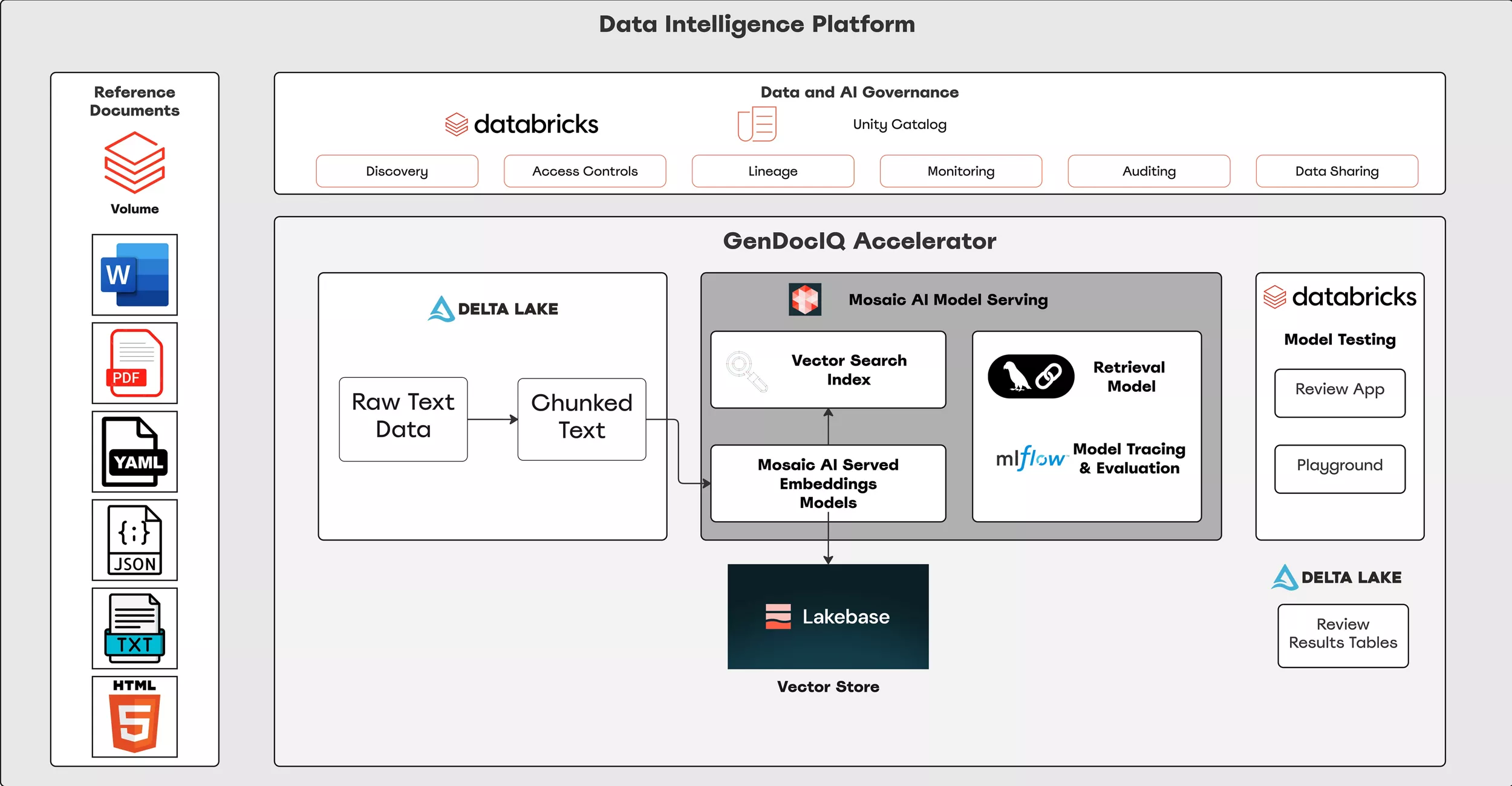
The starting point for this accelerator is a volume within the Databricks workspace. This is where unstructured contextual data is stored. Data can be stored in a wide variety of formats. For this use case, we want to create a retrieval engine that can answer questions about accounting compliance.
How to build production-ready RAG models with GenDocIQ
The accelerator sets up a full end-to-end pipeline for building production-ready GenAI applications that are scalable, measurable, and maintainable:
- Data preparation—Load and preprocess unstructured data into an LLM-friendly format.
- Vector store creation—Convert text into embeddings using Databricks models, and store them in efficient vector indexes (or a Lakehouse pgvector).
- Model configuration—Specify LLM choice, prompt design, and retrieval parameters, producing a Unity Catalog–registered model.
- Automated evaluation—Generate a custom evaluation dataset with LLM-created questions, log responses, and score them via MLflow evaluators for accuracy and safety. Engineers can iterate fast, fine-tuning until results meet enterprise standards.
- Deployment—Push the model to a Mosaic AI model-serving endpoint, ready for testing and API integration, or use in agentic systems like LangGraph.
Setup
Application parameters are defined in a configuration file, which specifies each Databricks resource to be created. This approach streamlines deployment by automating infrastructure setup, allowing engineers to focus on hyperparameter tuning and optimization. When the accelerator runs, all resources defined in the config file are automatically provisioned in the user’s workspace.
The following configuration file defines the parameters for your GenDocIQ deployment, including data sources, chunking strategy, vector indexing, and model setup. Each section can be customized to fit your organization’s specific data and retrieval needs.
//# Loading data from PDF files in volume into delta table
data_prep:
  volume_path: /Volumes/main/financial_compliance_rag/compliance_docs/ # Full file path to source documents
  raw_table: main.financial_compliance_rag.raw # <catalog>.<schema>.<desired table name> for raw text data

# Utilizing chunking strategy to break up text (Optional)
chunking:
  strategy: fixed     # Chunking strategy (fixed, context or custom. See testing/sample_config.yml for examples)
  chunk_size: 5000       # Character size of each chunk
  overlap: 250       # Overlap between each chunk
  out_table: main.financial_compliance_rag.chunk # <catalog>.<schema>.<desired table name> for chunked text data


# Index that contains vectorized data and is used for similarity search
index:
  vector_search_endpoint_name: fin_compliance_vse # Name of vector search endpoint compute resource
  index_name: main.financial_compliance_rag.fin_comp_index # <catalog>.<schema>.<desired index name> for vector search index
  embedding_endpoint_name: databricks-gte-large-en      # Embedding endpoint to use for creating vector representation

# Optional section to create vector store in Lakebase (Delete if not needed)
lakebase_vector_store:
  db_instance_name: fin-comp-rag-db # New or existing OLTP Database Instance
  catalog_name: fin_comp # New or existing DB Catalog name
  db_name: fin_comp_db # New or existing db name
  app_schema: fin_comp_app_schema # Schema for vector store
  synced_table_name: fin_comp_lb_vs # Vector store table name

# Experimenting with and deploying (optional) RAG model
rag:
  experiment_path: /Users/user.name@slalom.com/fin_comp_exp # /Users/<experimenting user name>/<experiment name>
  run_name: initial_run # Name to identify this specific run of the experiment
  llm_endpoint_name: databricks-meta-llama-3-3-70b-instruct # LLM endpoint to use for RAG app
  docs_returned: 3 # Number of documents returned
  model_temp: 1.00 # Temperature of model
  eval: True
  eval_table: main.financial_compliance_rag.eval # <catalog>.<schema>.<desired table name> for questions dataset for LLM as a judge eval
  prompt: >
    You are an assistant that answers questions. Use the following pieces of retrieved context to answer the question. Some pieces of context may be irrelevant, in which case you should not use them to form the answer.

    Answer in a concise, professional tone. If the context provided does not contain the answer or the question was not answered in previous messages, respond with \"The reference documents do not contain enough information to answer the question.\"
    \n\nContext: {context}
  model_name: main.financial_compliance_rag.fin_comp_rag # <catalog>.<schema>.<desired model name> UC catalog registered mode
  deploy: True # True if you want to deploy the model serving endpoint / False if only experimenting
  scale_to_zero: True # True if resources can be scaled to 0 when there is no activity / False if model needs to be available at all times
  review_instructions: >
    Use this application to review the outputs of the RAG application.
    Your feedback will be used to make improvements to future versions
This section of the configuration file outlines where the unstructured documents live in which volume of the Databricks workspace, and where this will be loaded into a structured table. This is the starting point for GenDocIQ.
Text chunking
Chunking is a preprocessing technique used to split large text blocks into smaller, more manageable segments that fit within an LLM context window. These chunks are then included in the prompt context to help the LLM generate accurate and relevant responses. GenDocIQ supports multiple chunking strategies, each designed to balance context preservation with performance efficiency. These include:
Fixed length
This is the simplest chunking strategy. The text is divided into uniform chunks of a predefined length, regardless of the content or semantic structure. Engineers can optionally specify an overlap between chunks to preserve continuity and reduce the risk of losing important context at chunk boundaries. While easy to implement, this method may split coherent ideas or concepts, potentially impacting model performance on tasks that rely on semantic understanding.
Context-aware
When source documents contain lengthy or complex concepts that don’t lend themselves to uniform chunking, context-aware chunking can enhance model accuracy. This approach leverages an LLM to identify key concepts and natural boundaries within the text. Instead of arbitrarily splitting the text into fixed-size chunks, the document is divided along these conceptual lines, preserving the integrity of major themes and ideas. As a result, chunks may vary in size—from as short as a sentence or two to spanning multiple pages—depending on the concept’s scope. To maintain compatibility with the LLM’s processing limits, a maximum chunk length can be set to ensure no chunk exceeds the model’s context window.
Custom
In addition to the two built-in chunking strategies, GenDocIQ supports custom text splitters for more specialized use cases. Engineers can create a Python file that defines a function returning a LangChain-compatible text splitter. This function is then referenced in the configuration file and used at runtime. This flexibility enables teams to incorporate advanced or domain-specific chunking strategies—such as LLM-based summarization, recursive character splitting, or other custom logic—to better suit their application needs.
Example of custom text splitter that can be used to split text data into smaller chunks:
from langchain_text_splitters import RecursiveCharacterTextSplitter

# Create your own text splitter using a langchain text splitter
def get_splitter():
    """
    Returns a RecursiveCharacterTextSplitter instance with predefined chunk size and overlap.

    This splitter can be used to divide large texts into smaller chunks for processing,
    with each chunk having a maximum size of 5000 characters and an overlap of 50 characters
    between consecutive chunks.

    Returns:
        RecursiveCharacterTextSplitter: Configured text splitter instance.
    """
    splitter = RecursiveCharacterTextSplitter(chunk_size=5000, chunk_overlap=50)

    return splitter
Embeddings
To be retrieved by an LLM, our text must first be vectorized using an embeddings model. This creates a vectorized version of the text, allowing for a similarity search to be performed using the chunked text. When a user writes a query to our model, the text of the query is also converted into a vector representation so a proper search of reference documents can be performed. This allows us to provide our LLM with documents that will help to answer the user’s question.
Once the vector representations of the chunked text have been created, there are two options for storing these embeddings: Mosaic AI Vector Search Index or Lakebase.
Mosaic AI Vector Search Index
The Mosaic AI Vector Search Index allows other applications from either outside or within Databricks to perform a similarity search to return relevant documents to an input query. The configuration below defines the endpoint, naming convention, and embedding model used to generate and manage the index.
# Index that contains vectorized data and is used for similarity search
index:
  vector_search_endpoint_name: fin_compliance_vse # Name of vector search endpoint compute resource
  index_name: main.financial_compliance_rag.fin_comp_index # <catalog>.<schema>.<desired index name> for vector search index
  embedding_endpoint_name: databricks-gte-large-en      # Embedding endpoint to use for creating vector representation
Lakebase Vector Store
Computed embeddings can also be stored in a Postgres database through Lakebase. This could be the preferred option if embeddings need to be accessed through an external application. The configuration below defines the database instance, catalog, schema, and table parameters for creating the Lakebase vector store.
# Optional section to create vector store in Lakebase (Delete if not needed)
lakebase_vector_store:
  db_instance_name: fin-comp-rag-db # New or existing OLTP Database Instance
  catalog_name: fin_comp # New or existing DB Catalog name
  db_name: fin_comp_db # New or existing db name
  app_schema: fin_comp_app_schema # Schema for vector store
  synced_table_name: fin_comp_lb_vs # Vector store table name
Experimentation
For many of the parameters mentioned above, there is often no single “best” approach to optimize accuracy. Instead, finding the ideal model design usually requires iterative experimentation and evaluation. GenDocIQ streamlines this process and helps accelerate model tuning.
The example below defines the experiment parameters—such as model endpoint, prompt design, and temperature—giving engineers flexibility to tune their retrieval application and test different setups.
# Experimenting with and deploying (optional) RAG model
rag:
  experiment_path: /Users/user.name@slalom.com/fin_comp_exp # /Users/<experimenting user name>/<experiment name>
  run_name: initial_run # Name to identify this specific run of the experiment
  llm_endpoint_name: databricks-meta-llama-3-3-70b-instruct # LLM endpoint to use for RAG app
  docs_returned: 3 # Number of documents returned
  model_temp: 1.00 # Temperature of model
  eval: True
  eval_table: main.financial_compliance_rag.eval # <catalog>.<schema>.<desired table name> for questions dataset for LLM as a judge eval
  prompt: >
    You are an assistant that answers questions. Use the following pieces of retrieved context to answer the question. Some pieces of context may be irrelevant, in which case you should not use them to form the answer.

    Answer in a concise, professional tone. If the context provided does not contain the answer or the question was not answered in previous messages, respond with \"The reference documents do not contain enough information to answer the question.\"
    \n\nContext: {context}
Like traditional machine learning (ML), building a retrieval application involves configuring numerous hyperparameters—such as the choice of LLM model, prompt design, and temperature—that can significantly influence performance. Integration with Databricks MLflow simplifies hyperparameter tuning, enabling you to efficiently track experiments and develop more effective models.
Evaluation
Effective evaluation of a RAG application requires a representative set of questions to assess model performance accurately. Ideally, these queries are sourced from real-world application interactions. However, when operational data is scarce or unavailable due to time constraints, LLMs can be leveraged to synthetically generate a comprehensive question dataset. The GenDocIQ accelerator automates this workflow by programmatically extracting and synthesizing evaluation queries based on the underlying document corpus.
Generated queries are then executed against the RAG model to produce response outputs. These outputs are subsequently subjected to quantitative evaluation using customizable metrics. The recent MLflow 3.0 release introduces native support for automated model evaluation pipelines, facilitating streamlined performance tracking and comparison.
In instances where human evaluation is either impossible or inefficient, an alternative method called “LLM as a judge” can be used. Here, a designated LLM functions as an automated evaluator, scoring RAG model responses against a defined set of evaluation metrics—referred to as MLflow scorers. GenDocIQ’s default configuration incorporates out-of-the-box scorers such as Relevance, Retrieval Groundedness, Retrieval Relevance, and Safety, providing multifaceted performance insights. Additionally, the framework supports custom scorer implementations, enabling tailored evaluation aligned with domain-specific requirements.
These features allow an AI engineer to quickly evaluate how a model is performing, experiment with different parameters, and continue to iterate until model performance is satisfactory.
Model deployment
Once experimentation and model refinement are complete, the model can be deployed for use by expert reviewers—either within Databricks or via external applications. Setting the deploy parameter to True in the configuration file triggers the GenDocIQ accelerator to deploy the model to a Mosaic AI model serving endpoint.
The following configuration block defines deployment parameters, including model naming, scaling behavior, and reviewer instructions. These settings determine how and where end users can access and evaluate the deployed model.
model_name: main.financial_compliance_rag.fin_comp_rag # <catalog>.<schema>.<desired model name> UC catalog registered mode
  deploy: True # True if you want to deploy the model serving endpoint / False if only experimenting
  scale_to_zero: True # True if resources can be scaled to 0 when there is no activity / False if model needs to be available at all times
  review_instructions: >
    Use this application to review the outputs of the RAG application.
    Your feedback will be used to make improvements to future versions.
This endpoint provides a scalable interface for retrieving, invoking, and testing the model. For external integrations, an API endpoint is automatically generated, enabling low-latency access to the deployed model. Within the Databricks environment, the model is accessible through the Model Playground, facilitating further interactive testing and validation.
Alternatively, to incorporate human feedback, the built-in review app can be leveraged. This tool enables domain experts to evaluate model responses, submit detailed feedback, and propose alternative answers to test queries. All feedback is captured and stored in an automatically created Delta table, which can then be used to augment or replace the LLM-generated evaluation dataset for more accurate model assessment.
Why GenDocIQ matters for enterprises
By automating infrastructure setup and embedding continuous evaluation into the development workflow, GenDocIQ helps organizations:
- Harness unstructured data at scale.
- Build trust in AI outputs through continuous and transparent evaluation frameworks that incorporate both automated and human-in-the-loop feedback.
- Overcome barriers moving from POC to production for document intelligence applications with seamless deployment capabilities and integration within the Databricks ecosystem.
- Maximize ROI on GenAI by ensuring systems deliver measurable value by enabling rapid experimentation, fine-tuning, and ongoing monitoring of retrieval-augmented generation models.
In short: GenDocIQ is the fastest way for enterprises to move beyond flashy AI demos and into scalable, production-ready deployments.
The future of GenAI in production
As the volume of unstructured data continues to grow exponentially, the ability to extract meaningful insights quickly and reliably will be a decisive competitive advantage. GenDocIQ equips organizations with the infrastructure and evaluation capabilities needed to harness this potential, making document-centric AI applications more accessible, trustworthy, and impactful. This positions GenDocIQ as not just a tool for today but as a critical enabler of next-generation AI-driven knowledge discovery and decision-making.
Generative AI’s future isn’t in isolated pilots—it’s in trusted, production-ready applications that deliver real impact. With GenDocIQ, Slalom and Databricks are giving enterprises a best-practice pathway to accelerate adoption, unlock ROI, and confidently deploy GenAI at scale.
Contributors: Soumya Ghosh